The AI-Native Company Blueprint
An operating system for running a company on AI as the underlying infrastructure.
Work in Progress — continually evolving through production use at BeanOS. Comments and discussion welcome via LinkedIn.
TL;DR
How to build an AI-native company.
Technical TL;DR: Blueprint for centrally managed, distributed and sandboxed AI agents, sharing business knowledge and APIs, with credentials held outside sessions and adversarial review for meaningful changes.
Executive Summary
Every company can benefit from AI — regardless of its size or industry. AI is essentially intelligence as a service: on-demand cognitive work that was previously only available by hiring humans. Software companies are naturally going all-in: agents write code, run tests, and carry workflows through to completion. BeanOS AI LLC operates with one human engineer by design.
But software companies already live in code, APIs, and version control — the natural habitat of AI agents. How do we bring these patterns to everyone else? To doctors' clinics managing patient scheduling and insurance claims. To retail stores optimizing inventory and vendor relationships. To car dealerships coordinating sales, financing, and service. To manufacturing plants running quality control, supply chain logistics, and compliance reporting. To law firms managing matters, documents, deadlines, and client communication.
What does an AI-native company look like operationally? AI agents do everything that does not require a high-stakes judgment call or direct human interaction. Humans set direction, make decisions, and handle relationships. The bottleneck shifts from labor to judgment.
This document presents a set of principles and an implementation walkthrough for building an AI-native company from the ground up — borrowing the patterns that are working in software engineering and generalizing them into an operating model for any business. The core idea: the company is defined by its version-controlled data and code; systems expose an API; a unified deterministic layer (the Company Bus / Company Kernel) mediates all API access, permission control, security, and audit logging; sandboxed AI sessions call through this layer for any action with side effects; and a task management mechanism progresses the company forward while halting when the human review backlog grows too large.
For technical readers: this operating model gives rise to the company as an operating system. The company has a kernel for all privileged APIs, creating an elegant separation of kernel-space vs. user-space actions. AI sessions are user-space sandboxed processes sending system calls to the company kernel for any action that affects the company.
Note: This text reflects the author's perspective, informed by experience and early, very promising, results. Implementing AI in business settings is still new and evolving, and must be approached with humility and a commitment to continuous learning.
What This Is
This document describes an operating model for a company where AI agents do the work and humans make decisions and steer.
Read this document with a greenfield mindset — imagine building a company from the ground up, without the burden of migrating legacy systems or retrofitting existing workflows. The principles are easier to reason about when you are not asking "how do I get there from where I am?" but rather "what would I build if I started today?" Once we have a clear north star, we can think concretely about how to transform an existing business toward it — that is top of mind, but out of scope for this document. BeanOS.ai is applying these principles with existing businesses as they become AI-native.
Scope: knowledge work delegated to AI. Some businesses are inherently social and dependent on human relationships — a chef's network, an investor relationship, a therapist's rapport. In these settings, AI supports the work; humans remain responsible for the relationships and interactions.
The document is organized in two parts. Part I establishes the foundational principles — tool-agnostic and durable. Part II walks through one opinionated implementation of those principles, grounded in how BeanOS operates in production with existing clients. The principles stand on their own; the implementation shows how to put them into practice, with further design goals identified where relevant.
We then explore how this operating model maps elegantly onto the architecture of an operating system — a more conceptual section that can inform how we think about building and evolving AI-native organizations.
Part I: Principles
Principle 1: A company as a versioned state
Let's define company state as all of its non-physical assets — data, metadata, knowledge, manuals, configurations, credentials, and so on. Everything that comprises the organizational memory and all the information used to make decisions and document them.
In a traditional company, this state is scattered across email threads, chat messages, Docs, PDFs, spreadsheets, tickets, people's heads, databases, and local machines. AI works on data it has access to, so this fragmentation makes retrieval inefficient and access management hard.
In an AI-Native company, state lives in accessible, version-controlled systems. All knowledge is shared; all data is reachable, avoiding tribal knowledge. Data may be unstructured (prose, attachments) or structured (JSON, YAML, tables, databases) — the more structured, the more efficiently agents can operate on it. Every piece of data that may drive action or decision is captured here: versioned, attributed, and reviewable.
When a decision is made or an action is taken, the company advances its state. That change is captured as a new version of the relevant digital assets, e.g. an update to the employee handbook, a record of a newly signed customer contract, new values written to the database.
Principle 2: actions are programmable
The goal is to have every action — creating, updating, sharing, transacting, filling out forms — executable via a programmatic interface, giving agents a direct path to execute any operation in scope. While computer-use capabilities are improving, UIs add friction that can easily be avoided by treating APIs as first-class assets of the company.
Principle 3: GUI is a view layer, built on top of APIs
Graphical interfaces sit above the API layer and call the same APIs that agents call. Humans and agents always share a single, consistent view of the data.
GUI is for human consumption and collaboration — it renders data, while APIs define it. For analytical and operational questions — "what is the state of the company?", "what happened last week?", "what needs my attention?" — an agent can explain the underlying state in natural language. A dashboard makes ongoing work, commitments, and decisions needing human attention visible at a glance. Agents can build additional pages and reports as needs emerge, using the same APIs.
Principle 4: Agents as organizational infrastructure
Agents are organizational infrastructure, defined by code like any other system component. Think Infrastructure as Code, but for agents: their behavior, knowledge, memory, and mandates are declared in versioned configuration and code, as an important part of the company state. Employees can still have personal assistants — personalization is achieved by focusing on the relevant portion of company state, keeping all context versioned and shared, rather than local and hidden.
Agents operate the company: they initiate work, produce artifacts, and act within their mandate. Humans steer: they set direction, review outputs, and approve consequential actions. Agents may adapt their behavior based on audience or context, and that adaptation is always driven by data in the versioned state — transparent and auditable.
Every outcome produced by agents is explainable, since all agent knowledge comes from the company's version-controlled state.
AI-fluent employees who already have a supercharged local setup may push back on this. The payoff is that every capability — knowledge, memory, skills — becomes a company asset, shared across everyone and continuously improving.
This principle is a derivative of P1 — if all company state is versioned, then agent definitions are naturally part of that state. We call it out separately because it stands on its own: a company can adopt P4 without adopting P1. Even in an organization where knowledge is still scattered across docs, emails, and people's heads, defining agents as shared, versioned infrastructure — rather than personal tools with private context — is a meaningful step that delivers value independently.
Principle 5: Explicit permissions govern shared company state
The company uses one shared knowledge repo and a permission policy defined for its deployment. The policy declares which resources sessions can access, which actions are delegated, and which require approval. It is version-controlled as part of company state.
Shared knowledge gives sessions the context to coordinate work. Permission to read that knowledge does not automatically authorize every action: the Company Bus enforces API access, while review and merge rules govern changes to the repo. Humans explicitly define where agents may act autonomously and where human judgment is required.
Principle 6: The session is the atomic unit of AI interaction
Every AI interaction is a session. Each session starts with access governed by the deployment's permission policy and a task to carry out against shared company state. Its identity is fixed at creation; the session cannot grant itself additional permissions. Access to APIs, outputs, and logs is enforced by the surrounding system.
Identity is session-scoped: each session carries its own identity and authorization. The agent is stateless between sessions — every session starts clean from the current company state.
What is an "agent"? An agent is the AI doing the work inside a session. Specialization comes from the task, instructions, and skills it loads from the shared repo. Sessions can focus on different functions while drawing on the same company knowledge.
Interactive and autonomous sessions follow the same deployment policy. A chat message provides direction; it does not change the session's permissions.
Principle 7: Human accountability over company state
Agents produce work faster than humans can review it. The system keeps humans accountable for what enters company state by making the review burden manageable and well-structured.
When designed correctly, every change to company state has a human accountable for the policy that permits it. Some work may be fully delegated to agents after automated checks and adversarial review; consequential decisions require human approval. This delegation is explicit, versioned, and a conscious choice by the humans who govern that data.
The system includes a mechanism to streamline the approval process — and, critically, to halt autonomous work when the review backlog grows beyond human capacity. Without this, agent output compounds unchecked: PRs pile up, changes go unreviewed, and accountability becomes nominal. The goal is to keep state transitions realistically reviewable at all times, so that human approval remains a genuine act of judgment rather than a rubber stamp.
This also shapes the profile of a valuable human employee in an AI-native company: a critical thinker who grasps the big picture, trusted with approving meaningful decisions — rather than spending their time gathering the artifacts to support decisions made by others.
Principle 8: AI work is fully auditable and replayable
Every AI action — every state transition, credential use, tool invocation, and session — is logged with full attribution: what was done, in which session, under which permission scope, and when. The audit trail is a first-class output of the system, built into every layer.
Because all AI work flows through a programmable layer and all state lives in versioned storage, comprehensive auditability emerges naturally from the architecture. Every session can be replayed from its logs. Every outcome can be traced back to the knowledge and tools that produced it.
Session logs are first-class company data — high-churn by nature, stored in the transactional layer alongside issues and work logs. They enable post-mortems and — critically — automated self-correction: future sessions can learn from past ones, evolving agent behavior without human intervention beyond approving the resulting changes.
Retention policies (TTLs, archival schedules) apply to audit data like any other company data — the principle is completeness of capture, not indefinite storage.
Principle 9: Structured work management as the engine of progress
An AI-native company runs on a unified, programmable work management system — the primary mechanism for advancing company state. It generates tasks on cadence or external triggers, tracks work in progress, captures work logs, and expresses dependencies and relationships between units of work.
This system is the engine: it is how the company moves forward autonomously without constant human prompting. Humans use it to review what happened and what is in flight. Agents use it to claim work, log progress, and trigger downstream tasks.
The system must be fully API-accessible. The specific form is an implementation choice.
Health is part of the engine. The work management system continuously asserts that the company is operating within healthy bounds — services are up, state matches declarations, queues are draining, SLAs are met. When an assertion fails, it generates work: an issue is created, a circuit breaker trips, or an alert is raised. Health checks are first-class work items that flow through the same system as everything else.
Principle 10: Sessions are sandboxed and ephemeral
Every session runs in an isolated container. The container is provisioned with the company's current state (a checkout of the relevant repo) and can interact with the outside world only through the Company Bus APIs. Inside the container, the session can do whatever it needs — run code, write files, spin up processes — without risk of affecting anything outside.
When the session ends, the container is scrapped. All meaningful output lives in company state — committed via a PR or a DB transaction during the session's lifetime.
Session resume is supported: a fresh container is provisioned, the prior conversation is loaded as context, and the session picks up from the current repo state. The container is still new; only the conversation history carries over.
Sessions run exclusively in cloud containers, never on end devices. End devices belong to the UI Views layer — the means by which humans review and interact with company state. Running sessions in dedicated containers ensures every session operates within its trust scope, with full audit coverage and consistent sandboxing guarantees.
The Architecture
The diagram below shows the conceptual layers. Arrows show the direction of interaction — humans initiate sessions and UI views; both are gated by the trust layer; actions execute against the API layer; all changes land in company state.
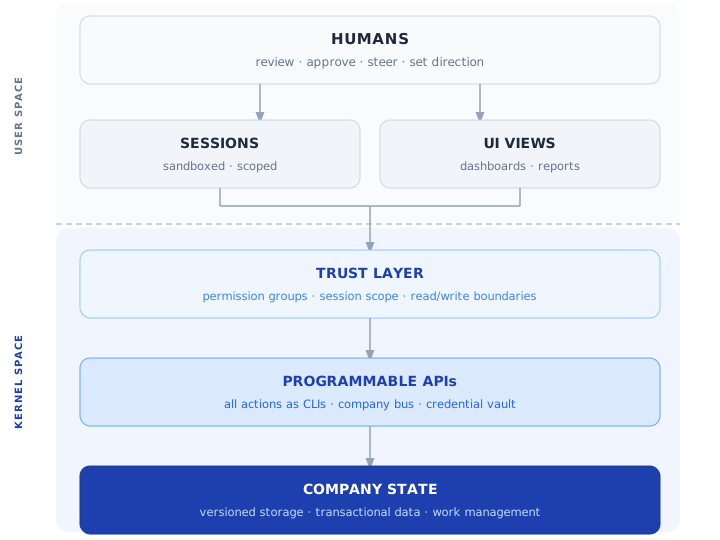
Sessions and UI Views are peer interaction modes — both feed into the trust layer, which gates all access to the API and state layers. Work management data lives inside company state, not as a separate layer — it is the engine that drives the company forward from within.
Part II: Opinionated Implementation
The following sections describe how BeanOS puts these principles into practice: one company knowledge repo, cloud data, a deterministic Company Bus, and sandboxed sessions. Design targets that go beyond the current implementation are identified explicitly.
Start with a small set of primitives: email and chat dispatch, the shared knowledge repo, file sharing, basic skills and documentation, and the ability to call company APIs and build pages. The AI learns the company through real tasks, turning what it learns into knowledge, reusable skills, and recurring work.
II.1 The State Store: One Repo and Cloud Data
(Implements Principle 1)
Company state lives in a single knowledge repo, databases, and cloud files, together with any external systems of record.
- All knowledge, configuration, workflows, playbooks, schedules, and agent memory live in the repo as markdown, code, and structured text files (JSONL, YAML). This includes durable knowledge about the team, finances, and roadmap. External systems of record, such as accounting software, remain part of company state and are accessed through their APIs.
- Data unsuited to git — binary assets, large datasets, records requiring deletion, and high-churn items like bugs and tasks — lives in cloud object storage and databases with transactional semantics and audit trails. Databases may be internal or provided by a SaaS tool.
- Documents produced for human consumption (PDFs, slides, dashboards, rendered HTML) are outputs — the source of truth remains in the state layer.
- Email and chat are transport, not state. They carry information in flight. Any information that matters is materialized into a PR or a database transaction. Emails and chat messages may be kept for archival purposes; the source of truth always lives in versioned state.
- Human laptops are ephemeral. Everything material lives in the repo or cloud data — a lost laptop means a lost device, not lost data.
Every change to the company's state flows through a pull request or a logged database transaction — a single, consistent audit trail for all state transitions.
Live infrastructure converges to the repo. BeanOS refreshes deployment configuration from main; runtime changes follow the build and deployment pipeline. Changes to infrastructure, agent behavior, or system configuration go through PRs, and health checks detect failures to apply the declared state.
Why a repo? Because git gives you versioning, branching, diffing, attribution, and review (PRs) for free. These are exactly the properties you need when agents are making changes autonomously — every change is traceable, reviewable, and reversible. The repo has a single main branch and linear history. Any other branch is considered ephemeral and not part of the state.
Object Storage: Immutable Blobs by Reference
Binary assets, rendered outputs, and large generated artifacts (PDFs, images, compiled binaries, model weights) belong in object storage, with pointers in the repo. For durable artifacts, the target design adds two constraints that must be enforced by the storage policy:
- Append-only. Objects are never overwritten in place. Every write produces a new object with a new content-addressed key. An existing object, once written, is immutable for its lifetime.
- Referenced by the repo. The repo holds the pointer, not the blob. A repo file contains the object's key or URL; the object is never embedded in the repo directly. Changing what a pointer points to requires a code change — which goes through a PR, gets reviewed, and lands in the audit trail like everything else.
Together, these two constraints mean a session can only add objects — it can never silently replace something a previous session wrote. Updating a generated artifact (e.g., replacing last week's report PDF) requires a PR that updates the pointer. The old object remains intact until its TTL expires.
TTL and lifecycle. Objects are assigned a TTL at write time based on their type — ephemeral outputs (decision pages, draft attachments) get short TTLs; canonical artifacts (signed contracts, compliance exports) get long ones. Expired objects are garbage-collected automatically. TTL policy is declared in the repo alongside the code that produces the objects.
These constraints protect existing artifacts when enforced; a bucket or a convention alone does not provide that guarantee. Publishing and sharing new objects still require the appropriate authorization.
II.2 The Company Bus and CLI-First APIs
(Implements Principles 2, 3, and 10)
The Company Bus
The foundation of the API layer is the Company Bus — a distributed server that mediates API integrations and credential use. Its authorization and dispatch logic is deterministic — AI work runs in sessions outside the Bus. The service can scale horizontally, while availability also depends on its databases, credential services, and external integrations.
We later introduce the analogy of the Company Bus to an operating system kernel. Like a kernel, changes to the Bus require rigorous review and testing. A proper design makes it pluggable — new API integrations can be added without modifying the core — while a compromised API implementation does not compromise the rest of the Bus.
Keeping the Bus deterministic is a hard architectural constraint. Scheduled jobs that require AI judgment are dispatched as messages to ephemeral session containers, which run them as autonomous sessions. The Bus is the scheduler and dispatcher; session containers are the workers. This separation keeps the Bus auditable, predictable, and easy to reason about — and ensures credentials and non-deterministic code never coexist in the same process.
Credentials stay outside sessions by default. API keys, OAuth tokens, and service account credentials live in a vault managed through the Bus. Sessions interact through the Bus and receive results without raw secrets. Any exception requires explicit, narrowly scoped authorization. When a session makes an API call, the Bus checks its identity and deployment policy against the requested operation — and either executes the call on the session's behalf or denies it. The session sees only whether the call succeeded — credentials stay fully abstracted.
This gives the Bus a natural role as the company's security and governance layer:
- Access control — calls are allowed or denied based on the session's identity and deployment policy.
- Audit logging — every API call is logged with the session ID, timestamp, and result.
- Rate limiting and heuristics — the Bus can enforce per-session call budgets, detect anomalous patterns, and trip circuit breakers without any changes to session code.
- Incremental observability — the simplest Bus implementation just passes calls through and logs them. A mature implementation adds layers of enforcement — token budgets, cost ceilings, hard rate limits per resource — incrementally, without changing how sessions work.
CLI-First
On top of the Company Bus, the implementation adopts a CLI-first approach: every API capability is exposed as a shell command. Sessions call CLIs; the Bus calls the external API. The session just runs commands — HTTP, OAuth flows, and credential management are handled transparently.
The implementation distinguishes two categories of CLIs:
- Container-local CLIs — operate entirely within the session container: file manipulation, git operations, build tools, test runners, code analysis. They have no network access to company systems and require no credentials. They are fast, safe to call freely, and identical whether run inside a session or on a developer laptop.
- Bus-mediated CLIs — cross the container boundary to call a company API. Under the hood, these CLIs route through the Company Bus, which handles authentication, credential injection, logging, and rate limiting. The caller sees a plain shell command; the Bus sees a structured, attributed API call. The distinction is invisible to the session by design — the same
--helpinterface, the same argument style — but architecturally they have different trust and cost implications.
This has a critical usability benefit: sessions discover and use APIs the same way they navigate the rest of the repo — via glob, grep, --help flags, or a semantic search layer over repo content. API documentation lives alongside the code it describes. A session that needs to send an email greps for the email CLI, reads its --help, and calls it. Skills and structured documentation in the repo provide additional progressive disclosure for more complex workflows.
Any UI built for humans sits on top of these same CLIs. The UI calls the same CLIs — anything a human can do through a dashboard, an agent can do through a CLI, and vice versa.
When an external system holds authoritative records, the CLI layer exposes its API. Where a local mirror helps, sync commands keep it reconciled in the repo or DB, with its source and freshness recorded. The external system remains authoritative for the records it owns.
Why CLI-first? Because agents operate through shell commands and file I/O. CLIs are trivially testable, scriptable, and composable. A REST endpoint requires a wrapper; a CLI is called directly. And because CLIs live in the repo alongside everything else, documentation is always where the agent already is.
II.4 Sessions: Sandboxing, Scope, and Initiation
(Implements Principles 6 and 10)
Container Isolation
Each session runs in an ephemeral cloud container provisioned fresh for that session. Containers are spun up on demand, run to completion, and torn down — there are no persistent session hosts. The container's network is hardened: outbound traffic is limited to the AI provider's API and the Company Bus — all external calls are mediated by the Bus (see II.2), keeping the container's network surface minimal and well-defined.
Inside the container, the session operates freely — running code, writing files, spawning subprocesses. When the session ends, the container is scrapped. Everything the session committed to company state persists; the container itself is disposable.
Sessions share the deployment's permission scheme. The Bus enforces it for each authenticated request; who happens to be present in a conversation does not redefine access.
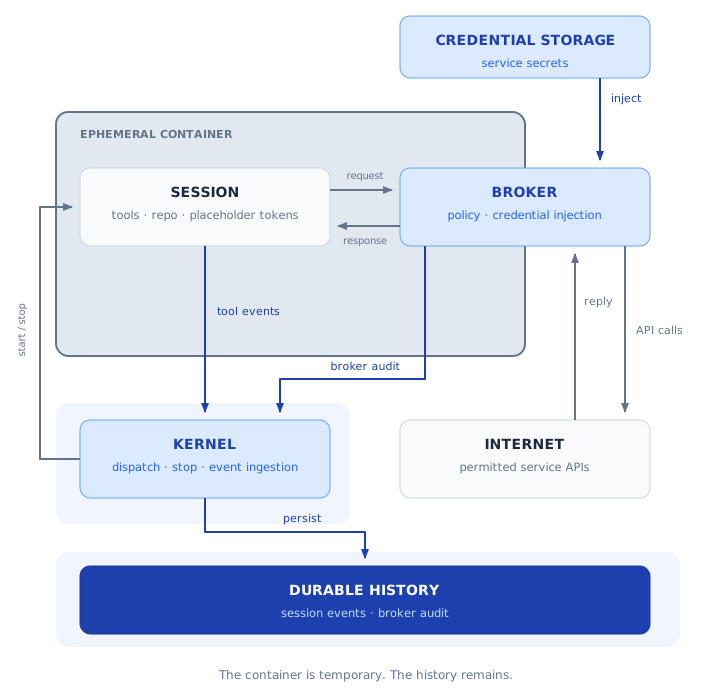
The broker is shown across the container boundary as a conceptual gateway. The container is temporary; credentials and durable history remain outside the session.
How Sessions Are Initiated
Sessions can be initiated through multiple channels — all route to a session queue and are picked up by an available container:
- Direct CLI — a human or cron job starts a session explicitly.
- Chat messages — a bridge monitors company chat spaces and routes messages to the session queue. The agent responds in the same chat space when done. From the human's perspective it looks like the agent is in the chat; behind the scenes, a full session lifecycle runs in an isolated container with a complete audit trail.
- Email — inbound emails can trigger sessions via a similar bridge, useful for approval flows and external escalations.
- Cron / scheduler — the work management system dispatches sessions on schedule or logical trigger (see II.7).
Chat and email remain transport — the message is the trigger, the PR or DB transaction the session produces is the record.
Human-in-the-Loop Approvals
Soft approvals happen in chat or email: the human gives direction or confirms a choice, and the session records the decision in company state.
Hard approvals are enforced by a merge gate. A privileged change is proposed in a PR, and the system applies it only after the required review and merge. A chat approval cannot bypass that gate.
Conversation Persistence and Resume
The session persists in the company DB. Resume provisions a fresh container, loads the prior conversation as context, and starts from the current repo state with a message "conversation is resumed, inspect new repo state". If the repo has changed since the last conversation, the agent sees both the history and the new state — it can identify what changed and decide how to proceed.
II.5 Human Accountability: The PR Model
(Implements Principle 7)
The PR Is the Unit of Work
Every change to the repo goes through a pull request; transactional actions follow the deployment's authorization policy and are logged. PRs are ephemeral branches — they exist only to facilitate review. Once merged, the branch is deleted and the main branch advances linearly. The company has only one main branch.
PRs are reviewed proportionally to their risk. A separate adversarial AI review session starts from trusted main, inspects the proposed changes, and challenges their correctness, security, and design. Its verdict applies to the exact commit reviewed; a changed PR needs a current review. Keep PRs small so both AI reviewers and humans can assess the evidence.
Folder owners can define additional review requirements within the shared repo. Ownership routes approval to the responsible person without fragmenting company knowledge.
The repo defines which changes agents may merge after required checks and adversarial review, and which need human judgment. Delegated merging follows this explicit policy; it does not bypass review.
Human judgment sets the pace for consequential decisions. A PR flood valve pauses agent-initiated cron jobs when the pending PR count exceeds a configurable threshold. The right investment is in making review faster and higher quality — better diffs, agent-assisted summaries, clearer PR descriptions.
The Big Red Button
The Big Red Button is the design goal for a company-wide emergency stop: suspend autonomous work and prevent further writes while humans investigate. BeanOS currently provides operator controls to stop sessions and suspend scheduled work. A universal read-only mode, guaranteed to block every write while keeping conversations available, should be treated as a further enforcement requirement.
II.6 Audit Trail
(Implements Principle 8)
The system produces a comprehensive audit trail by default:
| Source | What it captures |
|---|---|
| Git history (main branch) | Every change to the repo, with attribution and review trail. Linear history only — branches are ephemeral. |
| Company Bus logs | Every external action, credential request, and tool invocation — tagged with session ID |
| Session logs | Every agent conversation, tagged with session identity, task, and permission scope |
| Cloud DB audit logs | Every read and write to transactional data |
| CI/CD logs | Every build, test, and deployment |
| External system sync logs | Every sync between repo mirrors and external tools |
| Issue DB audit logs | Every state change, assignment, and work log entry, see below |
| Announcement logs | Every broadcast announcement — author identity, session, category, message, see below |
Session IDs are the connective tissue of the audit trail. Every session has a unique ID that flows through all downstream artifacts: PRs include the session ID in their description, issue work log entries are tagged with it, DB writes carry it, Company Bus logs record it. Any artifact — a PR, a work log entry, a DB mutation — can be traced back to the exact session that produced it, the conversation that drove it, the permission scope it operated under, and the recorded human direction.
Session logs are stored as first-class company data, protected by the deployment's access and retention policy. They are the foundation for post-mortems, compliance reviews, and automated self-improvement.
II.7 Issue Tracking and Cron: The Work Engine
(Implements Principle 9)
Issue Tracking: Repo for Definitions, DB for Instances
What lives in the repo (PR-reviewed, version-controlled):
- Issue templates — reusable templates for recurring issues.
- Repeated issue definitions — cron-like schedules that automatically create new issue instances in the DB.
- Issue policies — SLAs, auto-assignment rules, escalation triggers, priority definitions.
- Issue categories and labels — the taxonomy used to classify issues.
What lives in the cloud DB (transactional, real-time):
- Issue instances — from creation to completion.
- Assignees — which humans or sessions are responsible.
- Work log — timestamped entries recording progress, decisions, and blockers.
- Related conversations — links to conversation JSONLs.
- Subscribers — humans notified of updates.
- Snooze — temporarily suppress an issue until a date or event.
Cron Jobs
The shared repo defines scheduled work across company functions. Run history and results live in the transactional layer; durable findings and workflow improvements return to the repo through PRs. Repeated tasks grow into reusable skills and cadences as the AI learns how the company operates.
Notable cron jobs that every company should consider:
- Roadmap red team — critically evaluates the current roadmap against market conditions.
- Security red team — periodic scanning for exposed credentials, dependency vulnerabilities, anomalous access patterns, and attack surface changes.
- Competition research — periodic scanning of competitor activity.
- Documentation freshness and contradiction detection — scanning all repo knowledge for outdated information and internal contradictions.
- Self-evolving workflows — nightly review of recent conversations and PRs, spotting patterns where agents deviated from playbooks or repeatedly hit friction. The agent suggests PRs to update workflows accordingly.
- AI-CI/CD — a session triggered on every deploy that runs the full test suite and asserts overall system health. Equivalent to asking: "did this change break anything?"
Announcements Channel
The deployment has an announcements channel — a broadcast mechanism for real-time coordination between concurrent agent sessions. When an agent does something significant — merges a PR, starts infrastructure changes, claims an issue, hits a blocker — it posts an announcement. Active sessions receive announcements through the session coordination mechanism.
Humans can browse announcements in the dashboard to monitor agent activity at a high level.
II.8 Supporting Concerns
Security Measures
- Observable operations. Session activity, broker requests, review decisions, and changes to company state leave an attributable record. Operators can inspect ongoing work and investigate suspicious behavior from outside the session.
- Privileged actions require reviewed code. Work needing permissions unavailable inside a session must be implemented as code, independently reviewed, and merged before it runs with those privileges. The author must also "convince" an adversarial reviewer with evidence. Existing API actions follow deployment policy; consequential decisions require human judgment.
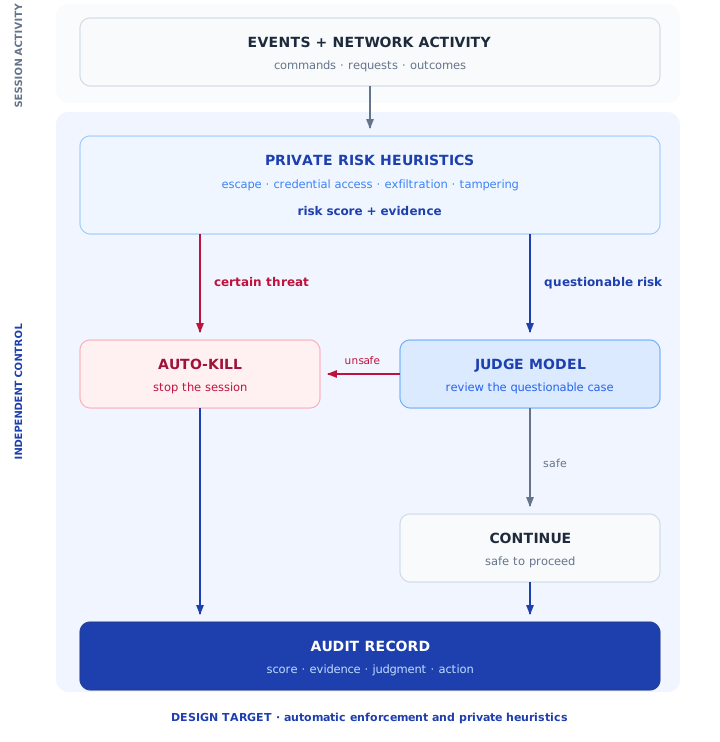
- Ongoing session risk assessment. A monitor outside the session evaluates its behavior for suspicious patterns. The design calls for pausing suspicious work for investigation and withholding detailed heuristics from the session, so it cannot tailor its behavior to evade them. Monitoring supplements explicit access controls and independent review.
- Ephemeral containers and credential isolation. Each session runs in a fresh, isolated container that is discarded when work ends. External calls pass through the Bus. Credentials are held outside sessions by default and never belong in the knowledge repo; exceptions require explicit, narrowly scoped authorization.
In production today: BeanOS provides deterministic risk scoring, alerts, and operator stop controls. Automatic risk-triggered enforcement, judge-model decisions, and isolation of the detailed heuristics remain design targets.
Design target: Certain threats automatically stop the session. Questionable risk profiles go to an independent judge model, which decides whether to stop the session or let it continue. The score, evidence, judgment, and action become part of the audit record.
Compliance
Access controls, review gates, retention policies, and audit records support compliance work. They do not establish compliance by themselves: requirements must be assessed for the business, its data, and the systems it uses.
CI/CD and Deployment
On every merged PR: build and test the change, deploy to the appropriate environment, notify affected sessions when shared workflows or interfaces change, and update telemetry. Deployments are designed for rollback — CI/CD maintains artifact history, and rollback can be triggered by humans, agents, or automated health checks.
Portability and Vendor Independence
The company's knowledge lives in one repo, alongside cloud data and external systems of record. Agent memory is markdown in git; conversations are JSONL. Swapping the AI provider behind the Company Bus requires changes only to the runtime layer, preserving knowledge, data, and workflows. Integration and validation work determine the actual switching cost.
Backup and Disaster Recovery
Recovery covers the knowledge repo, cloud databases, object storage, and external systems of record. Git history preserves versioned work; database snapshots and object backups protect the remaining state. Restore procedures must be tested together, including access configuration and retained records. Ephemeral sessions keep authoritative state off local machines, but cloud storage still needs a deliberate backup policy.
Operating Norm: See Something, Say Something
While working on a task, sessions (and humans) are expected to file issues for anything they notice outside the scope of their current work — bugs in unrelated code, stale configuration, a manual step that should be codified, a security concern, an improvement opportunity. The session files an issue and moves on. This norm ensures collateral problems are captured and tracked, even when they fall outside the current task's scope.
High-Churn Data Flood Valve
The PR flood valve works because PRs are coarse-grained — each one is a meaningful unit of review. High-churn transactional data (issue comments, work log entries, DB writes) is different: requiring review before each write would create unacceptable friction and defeat the purpose of the transactional layer.
A further design target is a batch review mechanism configurable per data type. Rather than blocking individual writes, the system pauses autonomous creation once an unreviewed backlog threshold is reached. For example: surface a human review prompt every 25 new issues, and pause autonomous issue creation entirely once 50 issues are pending review. The thresholds and review cadence are defined in the repo's merge policy and can be tuned per data type. This keeps agents productive while preventing runaway creation that overwhelms human capacity.
II.9 Operational Health
(Implements Principle 9)
A healthy company has observable invariants — properties that should always be true. The operational health system continuously asserts these invariants and feeds failures back into the work engine as issues or circuit breaker trips. Health check definitions live in the repo (versioned, reviewed like any other configuration); results flow through the standard audit trail; failures are just another kind of work.
Health Check Categories
Infrastructure health — is the company's runtime in good shape?
- Company Bus is reachable and responding within latency thresholds
- Session containers are provisioning and completing successfully
- Services are self-updating from main within the expected window
- External system integrations (email, calendar, CRM) are reachable
State drift — is the live state of the company consistent with what the repo declares?
- Live infrastructure configuration matches repo declarations
- External system mirrors are in sync with their sources (last sync within expected window, no unreconciled divergence)
- Agent definitions deployed in production match the repo's current versions
Work queue health — is work flowing at a sustainable rate?
- Pending PRs below flood valve threshold
- Unreviewed high-churn items below batch review threshold
- No issues past their SLA without a human acknowledgement
- Cron jobs ran within their expected window; no silent failures
- No sessions stuck in a running state beyond their expected duration
Implementation
The target is to express health checks as assertion CLIs — short commands that exit 0 (healthy) or non-zero (unhealthy) with a structured message explaining the failure. They are called by the health runner, a cron job that executes all registered checks on a configurable schedule and routes failures:
- Minor failures (e.g., a cron job missed one run) → create an issue at appropriate priority, assigned to the relevant agent
- Threshold breaches (e.g., pending PRs exceed flood valve) → trip the relevant circuit breaker and post an announcement
- Critical failures (e.g., Company Bus unreachable) → alert humans immediately via email/chat and halt autonomous work
New health checks are added by dropping an assertion CLI into the repo's health check registry — a versioned YAML file listing which checks run, at what frequency, and what failure routing to apply. The health runner picks them up automatically.
The Assertion as the Unit of Operational TDD
The health check registry is the company's test suite. Before deploying a new integration, a new workflow, or a new cron job, the author also writes the assertion that will continuously verify it is working. A feature is not done until its health assertion is green and running. This is Test-Driven Operations: define what healthy looks like before the work starts, and verify it continuously once it ships.
Frequently Asked Questions
How does the architecture keep agents safe and accountable?
Defense in depth: the Company Bus mediates external actions and keeps credentials outside sessions; containers isolate execution; PR gates require independent review; and operational logs make work observable. Session limits and operator stop controls bound execution. Ongoing risk scoring and alerts support investigation; automatic risk-triggered pauses and a universal write freeze remain design targets (see II.8).
How resilient is the architecture if a session container is compromised?
The architecture provides meaningful containment. Code changes happen in an isolated git worktree — they never touch main directly. A PR must pass the required checks and independent review before merging, with human approval where policy requires it. Under the immutable object-storage design described in II.1, file references in the repo point to immutable objects; replacing a stored artifact requires a code change that produces a new object reference, which flows through the normal PR audit trail. External API calls are rate-limited at the Bus. The highest-concern surface is the cloud DB: a hijacked session could create fake issues, manipulate work logs, or flood the issue table. Audit logs and point-in-time recovery can help investigate and repair database changes, but do not undo downstream actions or eliminate operational harm. Mitigations: rate-limit DB writes per session at the Bus, monitor for anomalous patterns (spike in issue creation, bulk assignment changes), and require human approval for high-impact DB operations in autonomous sessions.
Why shared company knowledge instead of a separate knowledge base per person?
Sessions specialize through their task and the skills they load from the shared repo. Shared knowledge lets them detect contradictions between people's assumptions and coordinate work across functions. Useful discoveries return to the repo, so the next session benefits regardless of who initiated it.
How do non-technical people use this?
Through chat, email, and shared pages. They interact in natural language; the agent translates to repo operations. Auxiliary UIs exist for common actions, built as thin layers on top of the same APIs agents use.
What about tools required for compliance (QuickBooks, etc.)?
If an external system provides meaningful value and exposes an API, we can treat it as part of the company state. When external software is required primarily for compliance, we use mirroring to keep agents productive: a sync mechanism maintains a mirror in the repo or internal DB so agents can operate on the data. Sync cron jobs keep them reconciled.
Is this tied to a specific AI vendor or cloud provider?
The company's knowledge lives in one repo, with transactional data and files in cloud systems. The Company Bus separates workflows from runtime and integration details. Switching providers preserves that knowledge, but still requires migration and validation of the affected integrations.
The agent knows the entire repo — doesn't that break at scale?
Context windows are growing fast, and for a small-to-mid-size company the entire repo's knowledge base may already fit. For now, smart loading is sufficient: sessions load what is relevant to the task, using repo structure as a navigation layer. When a repo grows beyond what fits in context, a semantic index layer is added as a CLI tool — think Google's internal code search. The agent searches for what it needs, reads the relevant files, and sparsely checks out only the files it intends to edit. This scales well even in very large monorepos, like Google's.
How is the PR review bottleneck addressed without making auto-merge more aggressive?
Keep PRs small, provide clear summaries and evidence, and use independent adversarial review. Explicit delegation lets routine work proceed after required checks; humans focus on consequential decisions. The flood valve pauses new autonomous work when the review queue grows beyond its configured threshold.
What about spreadsheets?
Spreadsheets are primarily a human visualization and collaboration tool, not a source of truth. The workflow is: the human and agent collaborate interactively in a spreadsheet (iterating on a financial model, a budget), and when the human is satisfied, they instruct the agent to materialize the result into the repo as structured data (JSON, YAML, CSV, or a markdown table — accompanied by code or a script to recompute values if inputs change). The spreadsheet becomes a scratch space; the repo gets the canonical version. This points to a broader cultural shift: humans must stop thinking as synthesizers and start thinking as analyzers. Agents do the synthesis; humans review, judge, and decide.
What about simultaneous edits — can two sessions modify the same file at once?
The first PR approved is merged; the second must resolve conflicts before it can merge. The session handles the rebase and text-level conflict resolution automatically. If the conflict is ambiguous — two versions with genuinely different intent — the session surfaces it in plain language ("Alice's version sets the price at $49, Bob's sets it at $45 — which should win?") and the human decides. No git knowledge required on the human's part.
How does the blueprint handle records that need to be erased, given Git's history?
Records requiring deletion belong in a store with deletion and retention controls, with only necessary references in the repo. Audit the deletion event without retaining the deleted content. Restore procedures must reapply deletions before data returns to use. The company must define these policies for its actual data and obligations; git history alone cannot satisfy them.
Does the blueprint require specific tools for repos, email, or chat?
No. What matters is that each system exposes an API or a CLI (or can be wrapped in one). GitHub, GitLab, or self-hosted git for repos; Gmail, Outlook, or any SMTP system for email; Slack, Google Chat, Teams, Telegram for chat — all work. The blueprint is tool-agnostic at the integration layer.
Won't giving each session access to all the knowledge slow things down?
Convergence to a meaningful result per session is the top priority. Because humans review outcomes, provide feedback, and approve, the system naturally paces itself — freeing sessions to be thorough rather than rushed. Sessions can explore, iterate, self-correct, and verify before presenting an outcome for review or approval.
The Company as an Operating System
The AI-native company operating model maps surprisingly cleanly onto the architecture of a computer operating system. An OS manages processes that share hardware resources. This blueprint manages sessions that share company resources. In both cases, a central privileged layer mediates all resource access, enforces permissions, provides isolation between workloads, and logs everything. Understanding the parallel helps build intuition for why the design is the way it is.
Concept Map
| OS concept | Company equivalent | The parallel |
|---|---|---|
| Kernel | Company Bus | The single privileged layer that mediates all resource access. User processes (sessions) never touch hardware (credentials/APIs) directly — they go through the kernel (Bus). The kernel is deterministic and tightly controlled; it never runs user code. The Bus is deterministic and never runs LLM sessions. |
| Process | Session | The atomic unit of execution. Each has a unique ID, an allocated resource scope, and an isolated environment. When it terminates, its resources are reclaimed. A process's PID is its identity for its lifetime; a session's session ID is its identity for its lifetime. |
| System call | CLI / Bus API call | The boundary crossing from user space into kernel space. A process requests a kernel service (read a file, open a socket) via a syscall — it cannot do these things itself. A session requests an external service (send an email, query a DB) via a CLI that proxies through the Bus — it cannot do these things directly either. |
| Virtual memory / address space | Container isolation | Each process has its own virtual address space and cannot read another process's memory. Each session has its own container and cannot read data outside its trust scope. The isolation is enforced by the underlying runtime (OS kernel / container runtime), not by the process/session itself. |
| File system + permissions | Company state + deployment policy | The file system stores persistent state under access controls. The company keeps knowledge in one repo and transactional data in cloud systems; deployment policy and review gates govern access and changes. |
| User / group model | Session identity and authorization | An OS checks the identity making a request. The Company Bus checks each session's identity against the deployment policy; a session cannot expand its own permissions. |
| Process scheduler | Work management engine | The OS scheduler decides which process runs when, allocating CPU time across competing workloads. The work management system decides which session runs when, dispatching tasks from the issue queue based on priority, SLA, and available capacity. |
| Daemon process | Autonomous / cron session | A daemon runs in the background without a controlling terminal, performing work on a schedule or in response to events. An autonomous session runs in a container without human participants, triggered by cron or a logical event, and terminates when its task is complete. |
| Shell | CLI layer | The shell is the human-facing interface to kernel capabilities — it translates typed commands into syscalls. The CLI layer is the session-facing interface to Bus capabilities — it translates shell commands into Bus API calls. Both abstract the underlying system while exposing its full power. |
| Inter-process communication (IPC) | Announcements channel | OS processes coordinate through pipes, signals, and sockets. Sessions coordinate through the announcements channel — a structured broadcast mechanism for status updates, warnings, and handoffs between concurrent sessions. |
| Audit log / syslog | Audit trail | The OS kernel logs system events (logins, privilege escalations, syscalls) to a central log. The Company Bus logs every external action, credential request, and tool invocation with full attribution. Session IDs are the connective tissue, just as PIDs are in OS audit logs. |
| Signal (SIGTERM / SIGKILL) | Session interrupt / Big Red Button | SIGTERM asks a process to stop gracefully; SIGKILL forces immediate termination. Operators can stop sessions. The Big Red Button extends this into the design goal of a company-wide write freeze; risk-triggered automatic pauses are a further target. |
| Core dump | Session JSONL on pause | When a process crashes or is interrupted, the OS can capture a core dump — a snapshot of its state for post-mortem analysis. When a session pauses (guardrail hit, awaiting approval), it produces a JSONL snapshot of the conversation — a complete record for review, resume, or post-mortem. |
| Boot from disk image | Container provisioned from repo | A computer boots into a known state from a disk image. A session container is provisioned from the current repo state — it starts in a known, reproducible configuration every time. |
/proc filesystem |
State inspectable via CLIs | Linux exposes live kernel and process state as readable files under /proc. Company state is always inspectable via CLIs that read the repo and cloud data — an agent can query any aspect of the current state the same way a sysadmin reads /proc/meminfo. |
| Watchdog timer / health daemon | Operational health checks (II.9) | OS watchdog timers detect hung processes and trigger recovery. The operational health system continuously asserts company invariants — services up, state matching declarations, queues draining — and routes failures into the work engine as issues or circuit breaker trips. The health check registry is the company's test suite. |
The Deepest Parallel: Kernel Space vs. User Space
The most important parallel is the kernel/user space boundary. In an OS, this boundary is fundamental to security: user processes access hardware exclusively through the kernel, which validates permissions, mediates every operation, and logs the access.
The Company Bus is this boundary for the AI-native company. Sessions (user space) access credentials, external APIs, and company data services through the Bus (kernel space), which validates the session's identity and deployment policy, mediates the call, and logs it.
This is why the Bus must be deterministic. A deterministic kernel is predictable and fully auditable — the foundation of system trust. The Company Bus inherits this property: by keeping all LLM sessions in user space, the privilege boundary remains deterministic, auditable, and easy to reason about.
The Scheduler Parallel: From Time-Sharing to Work-Sharing
Early computers ran one program at a time. The OS scheduler made time-sharing possible — many processes could share one CPU by taking turns. The AI-native company does the same at the organizational level: one Company Bus, many sessions, taking turns on tasks dispatched by the work management system. The issue tracker is the run queue; SLA priorities are the scheduling policy; the flood valve prevents the queue from growing faster than it can drain.
There is, however, an important difference from CPU scheduling. CPU-bound processes compete for a scarce compute resource. AI sessions are almost entirely I/O-bound — the dominant cost is waiting for inference responses from the AI provider. A session spends the vast majority of its wall-clock time waiting on API calls, not consuming compute at the Bus. This means a relatively modest Company Bus can serve many concurrent sessions simultaneously, the same way a web server handles thousands of concurrent connections despite running on modest hardware. The scheduling challenge for the AI-native company is queue management, SLA enforcement, and human review capacity — the Bus itself scales easily.
Appendix A: Prior Art & Related Work
This blueprint builds on a growing body of work at the intersection of AI agents and organizational design. We acknowledge the following related work and explain how this blueprint relates to each.
The LLM OS Metaphor
Andrej Karpathy introduced the concept of the "LLM as kernel process of a new Operating System" in September 2023, mapping LLM internals to hardware: context window as RAM, inference as CPU, embeddings as filesystem. His framing crystallized the intuition that LLMs are not chatbots — they are general-purpose compute.
This blueprint adopts the OS metaphor but applies it at a different layer. Karpathy describes the compute node — what a single AI agent is. This blueprint describes the distributed system built from those nodes — how multiple agents coordinate, how humans govern them, and how organizational state is managed. Where Karpathy's LLM is the kernel, this blueprint's Company Bus is the kernel — deterministic, credential-holding, and fully auditable.
AIOS: LLM Agent Operating System
AIOS (Rutgers University, COLM 2025) embeds LLMs into an OS kernel layer, providing scheduling, context management, memory management, and access control for concurrent agents. It achieves up to 2.1x faster agent execution through unified resource management.
AIOS and this blueprint are complementary, not competing. AIOS solves the runtime problem — how to efficiently run many agents on shared LLM infrastructure. This blueprint solves the organizational problem — what those agents are allowed to do, who reviews their work, and how the company's knowledge stays coherent. An AIOS kernel could serve as the runtime layer underneath a Blueprint-style company.
Enterprise Coding Agent Platforms
Open SWE (LangChain, March 2026) codifies the architecture that Stripe, Coinbase, and Ramp independently converged on for internal coding agents: isolated cloud sandboxes, curated toolsets, git integration. Devin (Cognition Labs), Factory AI, and OpenHands pursue similar approaches. This convergent pattern — sandboxed containers, git-native workflows, deterministic orchestration — validates the blueprint's execution model. These platforms apply the pattern to software engineering; this blueprint extends it to all company functions.
GitAgent
GitAgent (over 2,000 stars) proposes an open standard for defining agents as git repositories: agent.yaml for manifest, SOUL.md for identity, RULES.md for constraints. Its compliance-first design (FINRA, SEC) validates the need for regulated, auditable agent definitions. GitAgent defines how to describe individual agents in git; this blueprint shares the "Agent-as-code" philosophy while shifting the focus on sessions.
Future Improvements
This blueprint is a living document. The following areas are not fully addressed but are top of mind.
Security hardening — Prompt injection deserves explicit treatment as a threat model, even though the architecture's structural defenses (sandboxed sessions, deterministic Bus, PR review gates) provide strong containment. Conceptually, the Company Bus is a single API layer — a good implementation should partition it so that a compromise of one API integration limits the blast radius rather than exposing everything. Other open areas: Bus integrity monitoring, credential rotation and per-service scoping, append-only tamper-evident audit logs, DNS restrictions to close tunneling vectors, and real-time revocation of mid-session access. Security is top of mind for this blueprint and offers real value compared to the alternative: personal agentic setups where credentials are hoarded on local laptops with no centralized access control, auditing, or revocation.
Architectural refinements — Convergence detection (when to stop a spiraling session), announcement trust (preventing cross-session influence via broadcast), and git scaling at 50+ concurrent sessions where merge conflicts and review backlogs become bottlenecks.
Compliance and governance — Data classification and retention within the shared state model, formal incident response beyond the Big Red Button, data processing agreements with AI providers, and alignment with emerging AI regulations (EU AI Act, US executive orders).
Appendix B: AI-Native Self Assessment
A self-assessment for AI systems. Rather than rating your company yourself, you hand it to the AI agent you already use for work and it scores itself — against the knowledge it can actually reach, the actions it can actually take, and the guardrails it actually operates under.
Thirteen questions, scored 0–2, for a maximum of 26. It takes about two minutes.
It now lives on its own page, so it can be shared, linked, and handed to an agent without carrying the whole blueprint along:
- beanos.ai/ai-native-self-assessment/ — the full rubric, plus an in-browser scorer if you would rather answer it yourself.
- beanos.ai/ai-native-self-assessment.txt — the same assessment as a plain-text prompt, written to be pasted straight into Claude, ChatGPT, Copilot, Gemini, or an in-house agent.
Each question maps back to a section of this blueprint, so a low score points at the specific architecture that closes it.
License
© 2026 Gilad Pagi Ph.D.
This work is licensed under the Creative Commons Attribution 4.0 International License (CC BY 4.0). You are free to share, adapt, and build upon this material for any purpose, including commercial use, provided you give appropriate credit.
Contact gpagi@BeanOS.ai for questions.
Proudly created with Claude Code after many iterations and back-and-forth with humans. Don't be alarmed by the shallow commit history — this repo was auto-generated from an internal repository once the draft was ready to be shared.