Read-only
Your agent can view the page.
by BeanOS.ai
Share exactly one browser tab with your agent over an encrypted private channel. You choose what to share and stay in control.
Why Remote Tab
Modern agents run in the cloud. They have their own browsers, and for most work that is exactly right. But sometimes an agent needs your browser for one thing: the dashboard you are already signed into, a form behind your login, a workflow with no API. You should not have to hand over a browser profile or credentials, or set anything up, to make that happen.
Remote Tab lets you share one tab, for a limited time, with zero setup: install the extension, paste the code your agent gives you, and choose what it may do. You watch the work in your own browser and can pause or stop it at any moment. Commands and results travel end-to-end encrypted through a blind dead-drop server.
Features
browser_snapshot, browser_click, and browser_take_screenshot.npx remote-tab gives agents a CLI (preferred) and an MCP server.Get started
Control my tab using https://tab.beanos.ai/docs.
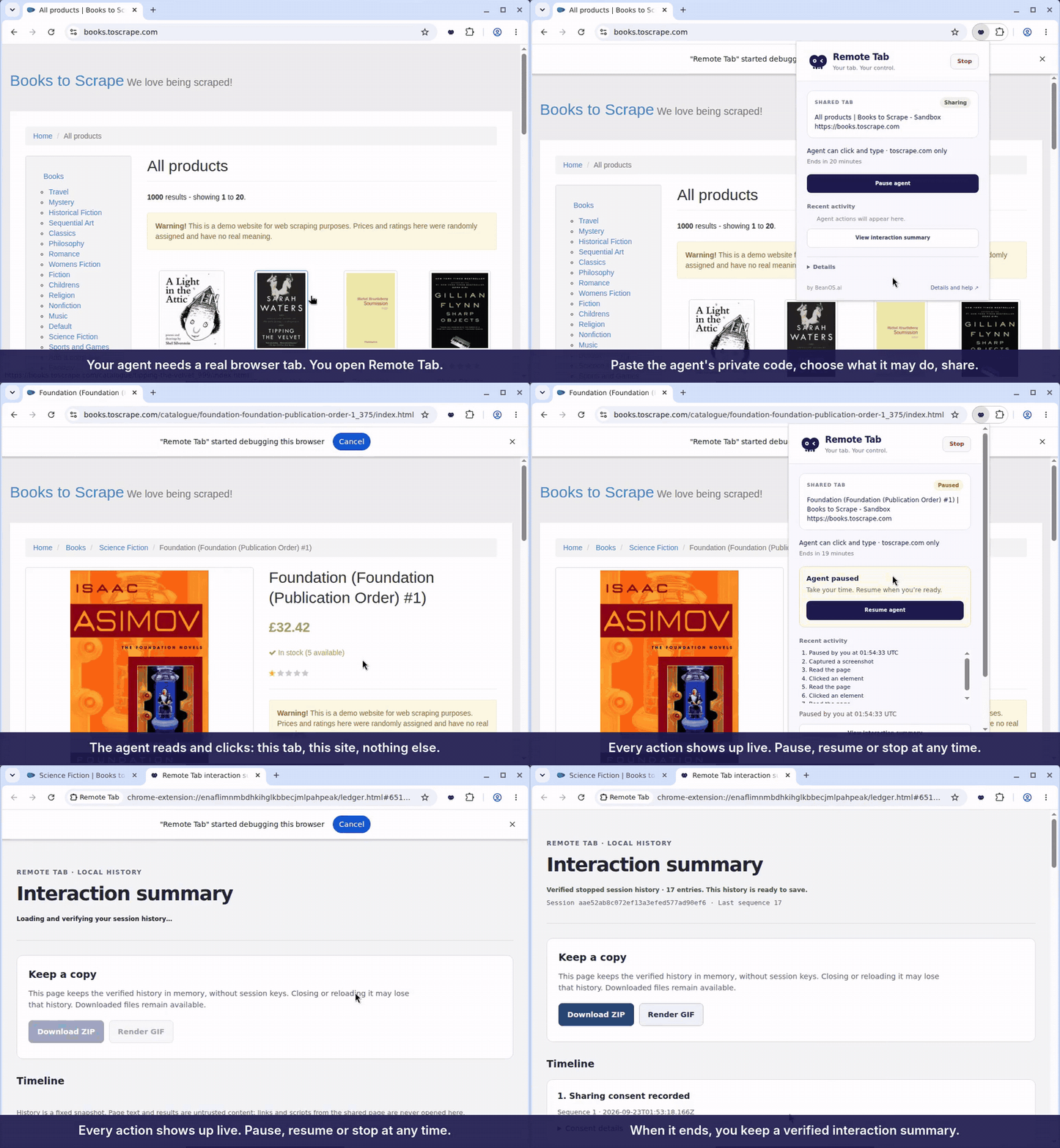
Your agent gives you a one-time code to paste into the extension. Here is how sharing works.
How to use it
rt1. over a private channel. Redeem it within 10 minutes; if it expires, ask your agent for a new code.Your agent can view the page.
Your agent can click and type.
Adds scripting and diagnostics, subject to the privacy limits below.
Pause pauses sharing whenever you need to take over. Resume continues it when you are ready. Stop ends the share.
The interaction summary shows everything the agent did. You can review its actions throughout the share.
Safety and consent
Only the one tab you explicitly share is exposed to your agent, never your whole browser. This site only limits that share to the current site.
Password, one-time-code, and payment fields are masked. Once these fields or uninspected embedded content are encountered, scripting and network/console diagnostics stay disabled for the remainder of that share, including in Full mode.
The share auto-expires. You can use Pause/Resume to control sharing at any time, or Stop to end it sooner.
Every action is recorded in a verifiable interaction summary that you can review.
Trust
This is the part worth reading twice. Remote Tab’s security boundary rests on a trusted relay. The official Chrome extension trusts tab.beanos.ai, and nothing else.
The project is open source, so that trust is yours to place elsewhere. Anyone can self-host the relay and load their own build of the extension pointed at it. If you would rather not depend on us, that path is open and supported.
If you do trust BeanOS, you are welcome to use the official version. It is free while it is experimental, and throttled for now.
Feedback welcome — tell us what breaks and what is missing at website.query@beanos.ai.
Both paths run the same code. The only question is whose relay stands between your tab and your agent.
| SELF-HOSTEDRun your own relay | OFFICIAL · BEANOSUse the BeanOS relay | |
|---|---|---|
| Price | FreeYou pay only for the infrastructure you run it on. | FreeWhile Remote Tab is experimental. |
| Relay | Yours. You deploy it, and it is the only server in the path. | tab.beanos.ai, operated by BeanOS. The official extension trusts it and nothing else. |
| Where your page data goes | Never reaches BeanOS. | Through the BeanOS relay, while a share is active. |
| Setup | Deploy the relay, build the extension, and point it at your own origin. | Install the extension and paste a code. Nothing to deploy. |
| Limits | Whatever your own infrastructure allows. Nothing is throttled by us. | Throttled to 20 requests per second. Verify your email address and it becomes 60. |
| Source and updates | MIT licensed, and you update on your own schedule. The public source release is still being prepared — ask us for access in the meantime. | Updates and fixes ship from us. Tell us what breaks at website.query@beanos.ai. |